
A good Odoo implementation should make a small business feel more organised, not more burdened. It should reduce repeated work, connect departments, improve reporting and give owners a clearer view of what is happening across sales, finance, stock, purchasing, customer service and operations. Yet many UAE businesses approach ERP with one simple question: how quickly can we install it?
That is understandable. Small business owners are already managing customers, staff, cash flow, supplier payments and daily decisions. But Odoo is not just software to install. It is a business system that needs to reflect how your company actually works. When implemented properly, it can become the backbone of your business. When rushed, it can become another tool that staff avoid.
This guide is written for small businesses in Dubai, Abu Dhabi, Sharjah, Ras Al Khaimah and across the UAE. It explains what implementation really means, which modules usually matter most, and how to avoid the mistakes that make ERP projects more expensive than they need to be.
Why small businesses in the UAE are considering Odoo
UAE companies often grow faster than their internal systems. A trading company may start with WhatsApp orders, Excel stock lists and manual invoices. A service company may begin with a basic CRM and separate accounting software. A clinic, school, retail shop or real estate office may use different tools for enquiries, payments, appointments and follow-ups.
This works in the early stage. The problem begins when enquiries increase, stock moves faster, VAT reporting becomes more sensitive, and the owner can no longer check every file manually.
Odoo is attractive because it brings many business functions into one connected platform. Sales can create quotations. Confirmed orders can connect to inventory. Deliveries can create invoices. Accounting can see transactions without waiting for files from sales or operations. Managers can check reports from one system instead of asking each department for a separate spreadsheet.
What Odoo implementation actually means
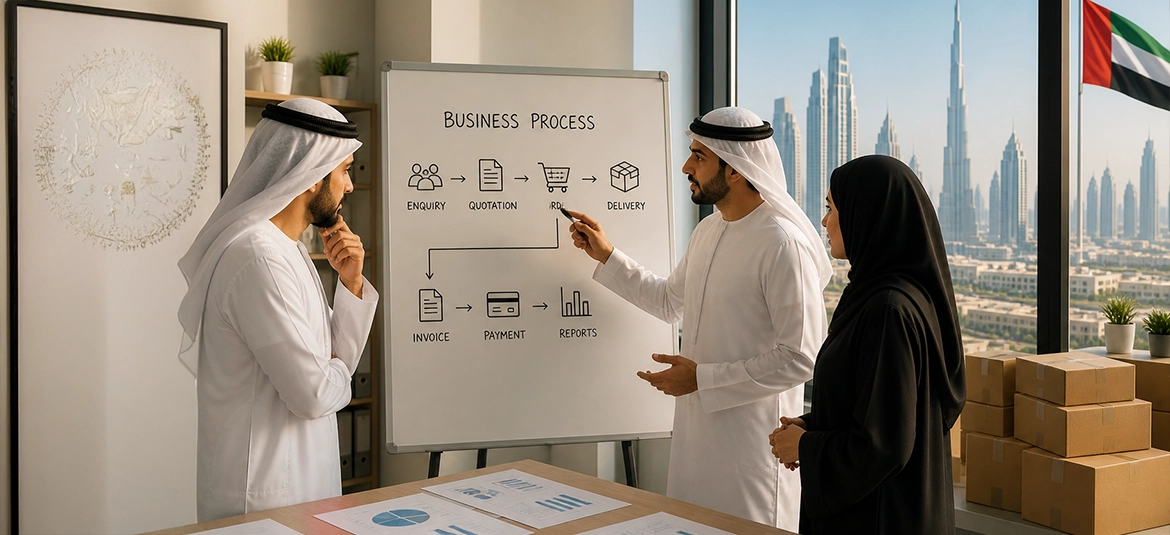
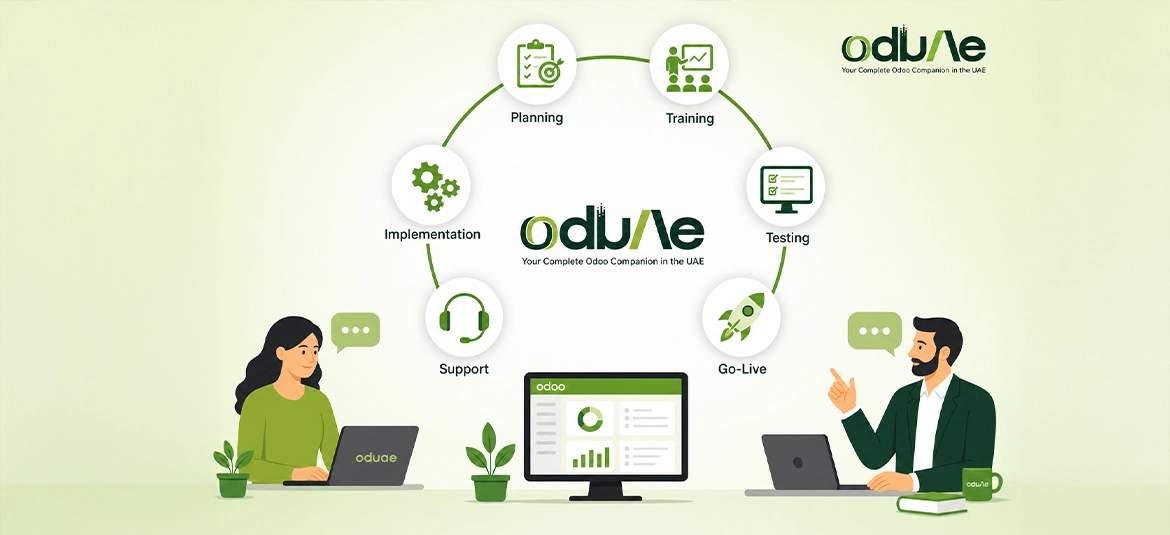
Odoo implementation is the process of setting up Odoo so that it supports your real business workflow. It is not only about creating user logins and installing apps. A proper implementation includes discovery, process mapping, module selection, configuration, data preparation, testing, training, go-live and post-launch support.
Think of it as moving from scattered working habits into a structured operating system. Your current process may be informal, but it still has logic: customers enquire, salespeople respond, prices are approved, goods are delivered, invoices are issued, payments are collected and reports are reviewed.
Implementation takes that real-life flow and builds it inside Odoo in a practical, usable way. The goal is not to make your business fit every default screen. The goal is to configure Odoo carefully, use standard features where possible, and customise only where there is a genuine business reason.
Start with the business problem, not the software menu
One of the biggest mistakes small businesses make is starting with a list of modules. They ask for CRM, Sales, Accounting, Inventory, Purchase, HR and Website all at once, then expect everything to be ready quickly. This usually creates confusion.
A better approach is to start with the business problem. What is currently slow, unclear or risky? Are leads being lost? Are quotations inconsistent? Is stock unreliable? Are invoices delayed? Is VAT reporting stressful? Are staff using too many spreadsheets? Is the owner unable to see the true sales pipeline?
Once the problems are clear, the module plan becomes more sensible. A trading company may need Sales, Purchase, Inventory, Accounting and CRM first. A service business may need CRM, Sales, Project, Timesheets and Invoicing. A retail business may need Point of Sale, Inventory, Accounting and Loyalty.
This is where an implementation partner should guide you honestly. More modules do not automatically mean a better system. The right modules, in the right sequence, produce better adoption.
The usual first modules for UAE small businesses
Most small businesses in the UAE begin with a core operational set. This may vary by industry, but the common starting point is usually CRM, Sales, Invoicing, Accounting, Purchase and Inventory.
CRM helps sales teams track enquiries, follow-ups and opportunities. Sales handles quotations and sales orders. Invoicing and Accounting support customer invoices, vendor bills, payments, tax reporting and financial records. Purchase helps manage supplier quotations and purchase orders. Inventory gives visibility over products, warehouses, receipts, deliveries and stock adjustments.
The key is to avoid launching everything at once unless the business is ready. A phased implementation helps staff learn gradually and gives management time to confirm that each process works properly.
UAE-specific requirements to consider
A UAE Odoo implementation should not be copied blindly from another country. Local business realities matter. VAT was introduced in the UAE at a standard rate of 5 percent, and businesses that meet the registration requirements must maintain accurate financial records and issue compliant invoices. This makes accounting configuration, tax mapping, invoice format and reporting discipline important from the beginning.
Many UAE businesses also deal with multiple currencies, especially when importing from Asia, Europe or the United States. Trading companies may need landed cost calculations, batch tracking, serial numbers, multiple warehouses and delivery workflows. Service companies may need recurring invoices, approvals and contract-based billing. Retail businesses may need POS controls, returns, discounts and branch-level reporting.
These details decide whether the system is comfortable for daily use.
Configuration before customisation
In Odoo projects, configuration means using built-in settings and standard features to match your workflow. Customisation means changing or extending Odoo through development. For small businesses, the safest rule is simple: configure first, customise later only when needed.
Customisation can be powerful, but it also increases cost, testing effort and future maintenance. Every custom field, report, approval or integration should have a clear business reason. If the same result can be achieved with a standard Odoo flow, that is usually better.
Good implementation is not about showing how much can be customised. It is about knowing what should not be customised.
Hosting and architecture should be decided early
Hosting affects performance, control, security, backup planning, customisation and long-term cost. Odoo can be used through cloud options or hosted on dedicated infrastructure, depending on the business size, workflows and technical requirements.
For many small businesses, a managed cloud setup is attractive because it reduces the internal technical workload. However, companies that need stronger performance, deeper control, custom modules, third-party integrations, scheduled backups or specific security policies should consider VPS, dedicated server or managed private cloud architecture.
This is especially relevant for UAE businesses that want predictable performance, clear data control and practical local support. Through AED1.host, we support Odoo hosting with dedicated VPS, managed cloud and server architecture optimised for UAE businesses. This gives companies a stable Odoo environment without needing to manage server administration internally. AED1.host can assist with performance-focused hosting, backup planning, SSL, server security, monitoring and scalable infrastructure as the business grows..
Data preparation can make or break the project
Most small businesses underestimate data preparation. They assume existing Excel files can be uploaded directly into Odoo. Sometimes they can, but often the data is incomplete, duplicated, inconsistent or outdated.
Before migration, clean your data. Decide what should be imported and what should be archived. Standardise product names, customer categories, supplier categories, units of measure and tax rules. Confirm physical stock and opening balances before go-live.
Clean data gives Odoo a clean start. Poor data creates frustration from the first day.
Training is not optional
A system is only successful if people use it correctly. Small business owners sometimes invest in software but try to save time on training. That usually creates problems after go-live, because users may return to spreadsheets, manual approvals or old habits when they are not confident inside the system.
Each user group needs role-based training. Sales staff should learn leads, opportunities, quotations and follow-ups. Accountants should learn invoicing, payments, reconciliation, VAT treatment and tax reports. Warehouse users should learn receipts, deliveries, stock adjustments and inventory accuracy. Managers should learn dashboards, approvals, reporting and how to monitor business performance from one place.
Training should use your actual business examples, not generic demo records. The more familiar the examples, the faster the adoption. This is where implementation experience matters. Ci CORP Group brings over 5 years of Odoo implementation and training experience across the Middle East, supporting different business verticals such as trading, services, distribution, healthcare, education, retail and professional companies. This practical exposure helps users understand Odoo in the context of their own daily work, not as a complicated software theory.
With the right training plan, Odoo becomes easier to adopt, easier to trust and easier to use across departments..
Testing before go-live
Testing is the stage where your team confirms that Odoo is ready for real business. It should not be skipped. A proper test should follow complete workflows from beginning to end.
For example, create a lead, convert it to an opportunity, prepare a quotation, confirm the sale, deliver the product, issue the invoice, register payment and check the accounting impact. Also test purchasing, returns, stock transfers and adjustments.
Going live in a controlled way
Go-live does not have to be dramatic. The best go-live is controlled, planned and calm. Choose a sensible date, ideally at the start of a new accounting period or after a stock count. Avoid launching during peak sales days or while key staff are unavailable.
Before go-live, confirm final data, user access, opening balances, stock quantities, invoice sequences, email settings and backup arrangements. Keep a short issue log for the first few weeks. Some corrections are normal. What matters is that they are tracked, prioritised and resolved quickly.
What support should look like after implementation
Odoo support after go-live should be practical and structured. Small businesses need someone who can answer questions, fix issues, guide users and improve the system as the business grows.
Support should cover user questions, bug fixing, minor configuration changes, report adjustments, access control, backups, performance checks and future module planning.
For UAE businesses looking for guided implementation and ongoing support, oduAe is the Odoo-focused brand by Ci CORP Group, with presence across Dubai, the UK and the USA. Its role is to help businesses approach Odoo practically, from planning and setup to hosting guidance, training and support.
Common mistakes to avoid
Do not start without a clear scope. Do not copy another company’s workflow without checking whether it fits your business. Do not customise every small preference. Do not migrate dirty data. Do not ignore user training. Do not let every employee request system changes without approval. Do not launch without testing. Do not treat go-live as the end of the project.
A practical Odoo implementation checklist
| Stage | What to confirm |
| Discovery | Business goals, pain points, users, departments and reporting needs |
| Scope | Modules, workflows, integrations, customisation limits and launch phases |
| Hosting | Cloud, VPS, dedicated server or on-premises requirements |
| Data | Customers, suppliers, products, stock, opening balances and tax information |
| Configuration | Companies, users, taxes, journals, warehouses, products and approvals |
| Testing | Sales, purchase, inventory, invoicing, accounting, reports and permissions |
| Training | Role-based sessions using real UAE business examples |
| Go-Live | Final data, backups, invoice sequences, support plan and issue log |
| Support | User help, fixes, improvements, reporting and future module planning |
Final thoughts
Odoo can be an excellent ERP choice for UAE small businesses, but the value comes from implementation, not installation. The system must be planned around your business, your people, your compliance needs and your growth plans.
Start with the real problems. Keep the first phase focused. Use standard Odoo features where possible. Prepare your data carefully. Train your users properly. Test the full workflow before launch. Choose hosting and support with long-term stability in mind.
When done well, Odoo gives small business owners something they often lack: one reliable view of the business. Sales, stock, finance, purchasing and customer activity begin to work together. Decisions become faster and reporting becomes easier.
That is the real promise of Odoo implementation in the UAE. Not just software, but a more organised, scalable and confident way to run the business.